
Claude Code Tools · $5 One-Time
Project Management for Claude Code
Stop losing track of what's on fire across your projects. Docket sweeps every repo's to-dos into one ranked daily plan and a real kanban board: install in about 5 minutes, $5 once.
Instant email delivery · installs in ~5 min · free updates for life · not happy? reply and we'll refund the $5.
Version 1.0.0 · updated Aug 2026. Built specifically as a Claude Code power-tool: you don't need to code, Claude Code installs it for you.
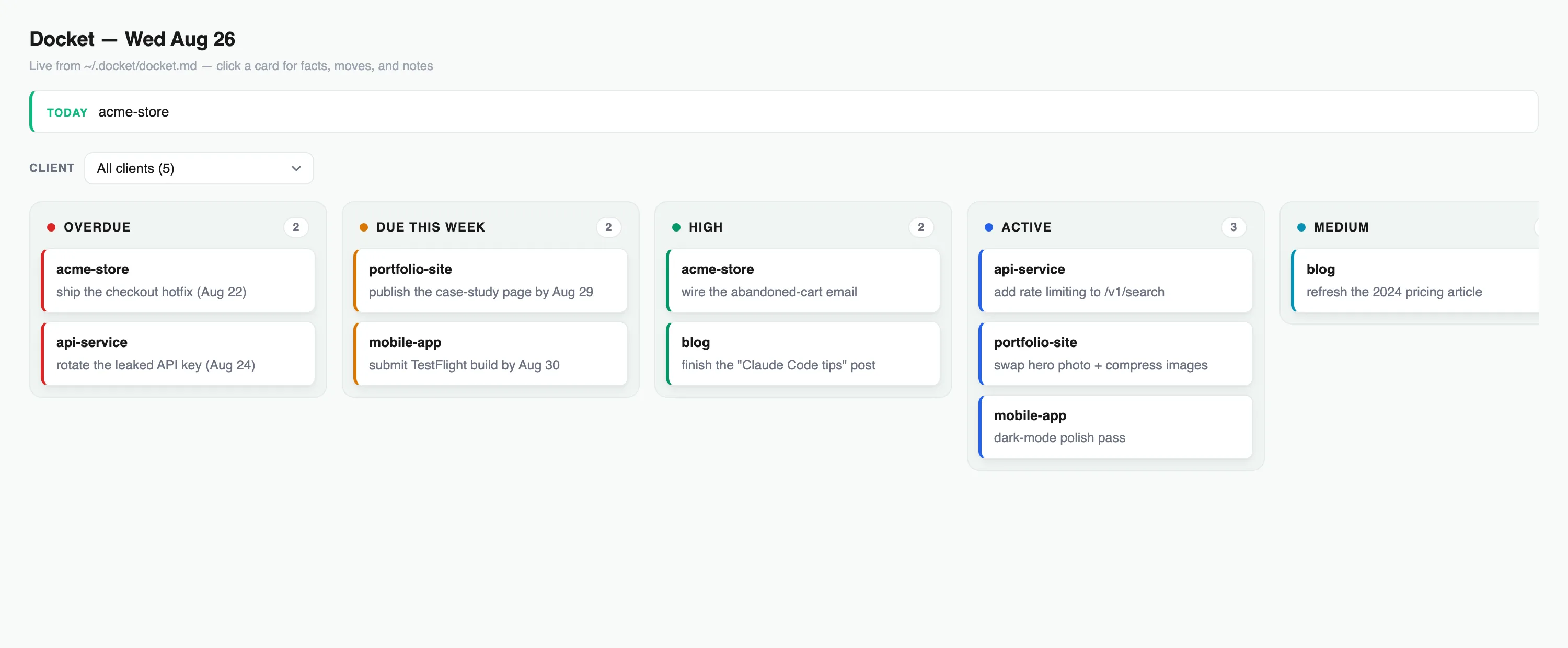
A live look at the board /docket opens, ranked and ready.
The problem
Manage all your projects with one command
Running Claude Code across a dozen repos means a dozen scattered to-do lists, half-finished notes, and no single place that says what actually matters today. Docket is a multiple project tracker built for exactly that: it sweeps every project you point it at and hands you one ranked plan, without you opening a single folder.
01
Scattered to-dos
Every project keeps its own notes, its own format, its own half-remembered status. Nothing lines up.
02
No ranking
Chat history is not a plan. You can't tell what's overdue, what's waiting on someone else, and what to do next.
03
Stale status
You update a project once, then forget. Three weeks later the notes lie to you.
The board
A real kanban board, not just chat
Docket doesn't just print a list in your terminal. It opens a real, clickable local kanban board for project management: columns for each stage, drag cards as work moves, leave notes on a card, and archive it when it's done. It's a real task manager that lives on your machine, not a wall of scrollback.
Built in
Built for your Claude Code agents and workflow
Docket installs two Claude Code agents that do the work for you: one sweeps your projects and ranks the plan, the other keeps each project's status fresh as you go. It slots straight into your existing Claude Code workflow, no new tool to context-switch into, no separate app to keep open.
01
Know what's on fire, instantly
Type /docket and get every overdue and urgent item across all your projects in one ranked list.
02
A real kanban board, not just chat
A clickable local board with columns, card moves, notes on every card, and a done-archive so nothing gets lost.
03
Works with any project setup
Flat, nested, or scattered folders, one project or fifty. Docket discovers them, you don't configure a thing.
04
Never goes stale
A keeper agent refreshes each project's status as you work, so the plan matches reality, not last month.
05
Catches what's slipping
Surfaces overdue items and what's due this week, and flags contradictions in your own notes before they cost you.
06
100% local and private
Reads your files, runs a local server. Nothing leaves your machine, ever.
07
No coding required
Claude Code installs it for you. Paste one prompt, answer 3 questions, done.
~20
Live client projects it tracks daily
~5 min
Time to install
$5
One-time, no subscription
We didn't build Docket as a demo. It runs Zio's own agency workload (roughly 20 active client projects) every day, and we packaged it so other Claude Code users could buy the same system in one command.
Why it's different
An AI project manager that lives in your repo
Most project management tools want you to log in somewhere else and re-type what you already told your AI coding assistant. Docket flips that: it's an AI project management tool that reads the notes you already keep, in the projects you already have open, and turns them into a plan and a board without a second system to maintain.
Installs in ~5 minutes. Paste one prompt, answer 3 questions, done.
How it works
How it works: install in 5 minutes
Buy it and get your file
Pay the one-time $5. We email you the .md file from [email protected].
Paste it into Claude Code
It interviews you: where are your projects? Then it installs the two agents and the board itself.
Type /docket anytime
Get today's ranked plan across every project, and the board opens at localhost.
No coding required. If you can paste text and answer three questions, you can install Docket.
Pricing
One price. Own it.
Docket System for Claude Code
Version 1.0.0 · updated Aug 2026
- •The full Docket install prompt (.md)
- •One-command daily docket across every project
- •A local kanban board, click-through and clean
- •Free updates emailed to the same link
Instant email delivery from [email protected] · not happy? reply and we'll refund the $5.
Questions
FAQ
Does this work with ChatGPT?▼
No. Docket is built specifically for Claude Code, the AI coding assistant that runs on your machine. It installs a local agent and runs a local server, so it will not work by pasting it into ChatGPT or any web chat.
Do I need to know how to code?▼
No. Claude Code does the setup for you. You just need Claude Code installed and Python 3, which is standard on Mac and Linux.
What exactly do I get for $5?▼
One .md file emailed to you. Paste it into Claude Code and it installs the whole system: two agents, a kanban board, and the /docket command.
Will it mess with my projects?▼
It only adds a small status marker to each project's CLAUDE.md and runs a local board. Nothing leaves your machine.
Do I get updates?▼
Yes. When the pack is updated we email buyers the new version at the same link.
Stop hunting for what to work on next.
$5 once, installed in 5 minutes. One command, every project ranked.
Instant email delivery · free updates for life · not happy? reply and we'll refund the $5.