
Claude Code Tools · $29 One-Time
QuickBooks AI agent: ask Claude who owes you money
In your own QuickBooks. Your keys never leave your computer. This kit connects Claude Code to QuickBooks Online through your own Intuit app, then gives you ready-made commands: who owes you (with pay links), who you forgot to bill, reminders, P&L, and invoices you approve one at a time.
Instant email delivery · about 30 minutes of setup plus Intuit's review · free updates · not happy? reply and we'll refund the $29.
Version 1.0.0 · updated Oct 2026. Needs Claude Code, Node 18+ and a free Intuit developer account. No coding: Claude Code sets it up for you.
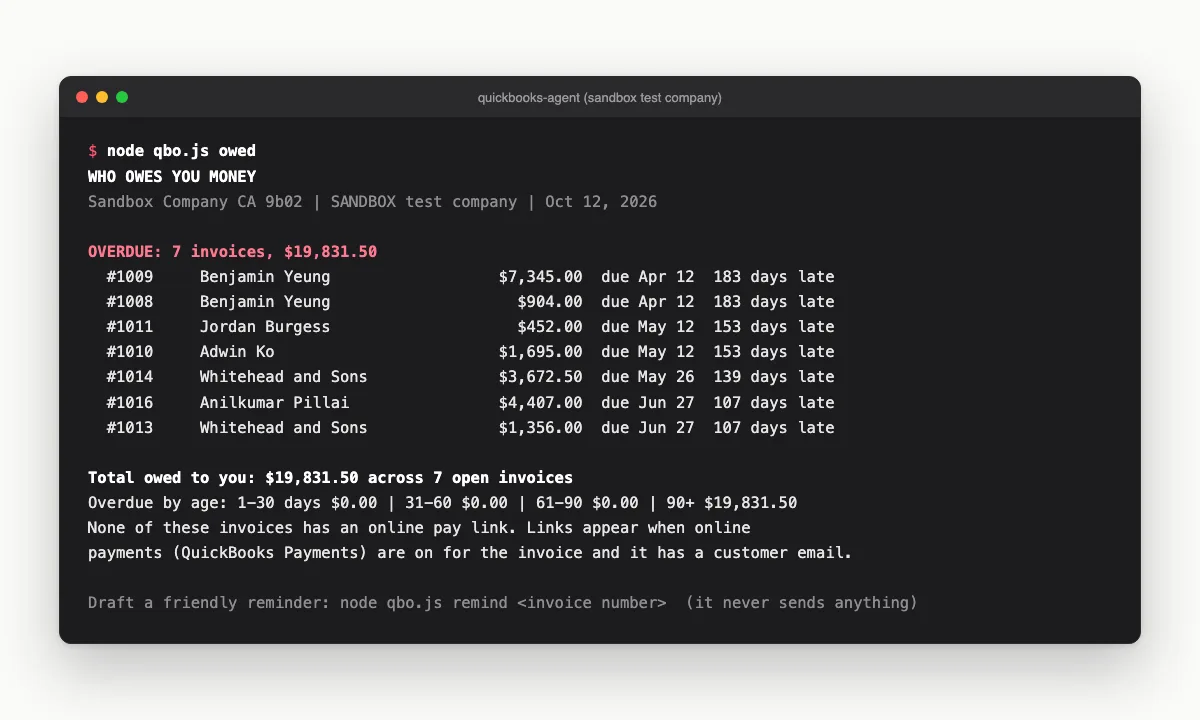
The real owed report, run on Intuit's sandbox test company (sample data, not a real business).
What you can ask
The questions owners actually ask their books
Ask in plain English and Claude runs the right command against your QuickBooks. Every answer comes from your live books, not a spreadsheet export from last month.
01
Who owes you, right now
owed
Open invoices, what's overdue and by how long, and each invoice's online pay link when QuickBooks Payments is on.
02
Who you forgot to bill
forgot
Customers you billed in each of the last three months but haven't billed this month.
03
Reminders, ready to send
remind
A friendly follow-up with the amount, due date and pay link. You paste it into your own email. It never sends anything.
04
Invoices you approve first
invoice
A preview with the next invoice number, line items and tax. Nothing is created until you run it with that preview's approval code.
05
P&L and balance sheet on demand
pnl · balance
Plain-text reports for the period you ask about, right inside Claude Code.
06
Look anything up
invoices · customers · show
Recent invoices, your customer list, or one invoice line by line, without opening QuickBooks.
Your books, your keys
QuickBooks has no read-only API access, so we built the guardrails in
Any app you connect to QuickBooks Online is allowed to write, because Intuit offers one combined permission for reading and writing. That is why the kit is built around preview first, approve second.
- Every command except creating an invoice only reads. Invoices start as a dry-run preview with an approval code, and nothing is written until you run it with that code.
- It never emails your customers. Invoices are created without sending, and reminders are drafts you copy into your own email.
- You create your own Intuit app. Your keys and tokens live on your computer, and Zio never sees them or your books.
- Keys go in through a command that never displays them, and the doctor check reports what's set up without printing a secret.
The kit is a tool, not accounting or tax advice. You review everything before it touches your books.
Same day
Intuit approved our production keys
~$1,370/yr
Unbilled hosting our first audit found
$29
One-time, no subscription
We built this for our own books first. Giuseppe connected Zio Advertising's QuickBooks in October 2026, Intuit approved the production keys the same day, and the first billing audit we ran on the connected books found about $1,370 a year of website hosting we weren't billing for. The kit is that setup, cleaned up so it runs on your books instead of ours.
What's inside
Everything you need to connect your own QuickBooks
- •One self-installing .md for Claude Code. The installer checks every file it writes with SHA-256 before anything runs.
- •A small local connector (Node 18+, two dependencies, no build step) with the owner commands above, plus taxcodes and a doctor health check.
- •Three callback pages (callback, launch, disconnect) plus starter privacy and terms pages, filled in for you to host on your own domain.
- •The production-keys playbook: the Intuit app details, the compliance questionnaire, and an answer template filled in for your business.
- •A six-step sandbox test: connect, pull a report, trigger a handled error, disconnect, confirm it's cut off, reconnect.
- •Keys entered through a command that never displays them, kept in a private file that is excluded from git.
Instant email delivery · about 30 minutes of setup plus Intuit's review · free updates · not happy? reply and we'll refund the $29.
How it works
From purchase to “who owes me?” in five steps
Get the file
Pay the one-time $29. The kit arrives by email from [email protected].
Paste it into Claude Code
It asks a few questions (your business name, the domain for your callback pages), builds the connector in a new folder, and checks every file.
Test on a free sandbox first
Create your own Intuit developer app and run the sandbox test. Those are the tests Intuit's questionnaire asks about, so your answers are true.
Get production keys approved
Host the three small callback pages on a domain you own, then follow the playbook through Intuit's app details and questionnaire.
Ask Claude who owes you
Connect your real QuickBooks and run owed. From there: forgot-to-bill checks, reminders, P&L and invoice previews.
Setup takes about 30 minutes, plus however long Intuit takes to review your production keys. Our own review came back the same day.
Your options
QuickBooks MCP servers and connectors, compared
There are good ways to connect QuickBooks to an AI assistant. The real differences are what it costs, who holds the connection to your books, and how much setup you do yourself.
Intuit's official QuickBooks MCP server
- Cost
- Free, open source
- Who holds the connection
- You. Your own Intuit app and keys.
- Setup
- Developer-oriented. You create the Intuit app, get production keys approved and run the server yourself. A broad toolkit across the QuickBooks API.
- Best for
- Developers comfortable with OAuth and MCP configuration.
Hosted connector platforms (Composio, CData Connect AI)
- Cost
- Plan-based pricing
- Who holds the connection
- The platform connects to QuickBooks on your behalf, and Claude talks to the platform.
- Setup
- Quick sign-in, usually without an Intuit developer app of your own.
- Best for
- Teams already using that platform to connect many apps.
Hosted QuickBooks AI apps (such as Kipper or DeepLedger)
- Cost
- Monthly subscription
- Who holds the connection
- The app's servers.
- Setup
- Sign up and connect. A finished app with its own interface.
- Best for
- People who want a ready-made app and are fine with a monthly fee.
This kit
- Cost
- $29 one-time
- Who holds the connection
- You. Your own Intuit app, with keys on your computer.
- Setup
- About 30 minutes plus Intuit's review, guided step by step by Claude Code, including the production-keys questionnaire.
- Best for
- Owners who want private, local access and ready-made owner commands without a subscription.
If you're a developer, Intuit's free server may be all you need, and the kit's production-keys playbook works for it too. The kit earns its $29 with the non-developer walkthrough of Intuit's approval (including the sandbox tests that make your questionnaire answers true) and the owner commands built in.
Pricing
Do it yourself, or have it done with you
QuickBooks Agent for Claude Code
Version 1.0.0 · updated Oct 2026
- •The self-installing kit (.md) for Claude Code
- •Owner commands: owed, forgot, remind, pnl, balance, invoice
- •Callback pages and the production-keys playbook
- •Free updates emailed to the same link
Not happy? Reply and we'll refund the $29.
Done-for-you setup
A 45-minute call with Giuseppe
- •We set up your Intuit app and walk through the production-keys approval together
- •We connect your real books and run your first who-owes-me report with you
- •You sign in to QuickBooks yourself. We never ask for your password
- •The kit is included
After payment, reply to our email with 2-3 times that work and we'll book the call.
Need more than QuickBooks? For custom automation across your tools and team, we start with a paid AI Discovery Session. Talk to us about it →
Questions
QuickBooks AI agent FAQ
Do I need to be a developer to use this?▼
No coding is needed. You need Claude Code, Node 18 or newer, and a free Intuit developer account. Claude Code builds the connector and walks you through each step. Plan on about 30 minutes of setup, plus the time Intuit takes to review your production keys.
Does my QuickBooks data pass through Zio?▼
No. You create your own Intuit app, and the connector runs on your computer. Your keys sit in a private file on your machine and go in through a command that never displays them. Zio never sees your keys, tokens or books, and there is no Zio server in between.
Can the AI change my books?▼
QuickBooks Online does not offer a read-only API permission, so any connected app is technically allowed to write. The kit adds its own guardrails: every command except creating an invoice only reads, and an invoice is created only after you see a preview and run it with that preview's approval code. It never emails invoices or reminders to your customers.
Why does Intuit make me fill out a questionnaire for my own keys?▼
Intuit requires an app assessment before it issues production keys, even for a private app that only you will use. The kit includes the exact path that got our own app approved the same day, plus an answer template filled in for your business. You run the sandbox tests first, so your answers about testing are true.
Why can't I use localhost as my redirect URI?▼
Intuit accepts localhost for sandbox (development) keys, but production keys need an HTTPS redirect on a real domain. The kit includes three small static pages (callback, launch and disconnect) that you host on a domain you own, and free static hosts work. The callback page hands the sign-in back to your computer.
What happens when the connection expires?▼
Access tokens last an hour, and the connector refreshes them automatically. QuickBooks also rotates the refresh token every time it is used and lets it lapse after about 100 days without use, so the connector saves the newest one each time. If it ever lapses, the agent tells you and you reconnect with one command.
Isn't there an official QuickBooks MCP server?▼
Yes. Intuit publishes a free, open-source QuickBooks Online MCP server on GitHub, and it is a strong choice for developers. It also needs your own Intuit app and production keys, and you run it yourself. This kit is for owners who want a guided path: the production-keys walkthrough, the callback pages, and ready-made commands like who owes me and the forgot-to-bill check, for a one-time $29.
Does it work in Canada and outside the US?▼
It is built on QuickBooks Online and was first run on a Canadian company's books. Sales tax differs by country and province (GST/HST, US sales tax), so during setup the kit lists your QuickBooks tax codes and you pick the right ones instead of the kit guessing.
Can I use it with ChatGPT?▼
No. It is built for Claude Code, which runs commands on your own computer. If ChatGPT is your tool, Intuit offers its own ChatGPT connection.
What if I get stuck?▼
Reply to the delivery email and we'll help. If the kit isn't for you, reply and we'll refund the $29. Rather not do it alone? Book the done-for-you setup and Giuseppe connects it with you on a 45-minute call.
Know who owes you before your coffee's cold.
$29 once. Your QuickBooks, your keys, your computer.
Instant email delivery · about 30 minutes of setup plus Intuit's review · free updates · not happy? reply and we'll refund the $29.