
Connect QuickBooks to Claude Code: Setup Guide 2026
Quick Answer
Connecting QuickBooks Online to Claude Code means registering your own app with Intuit, passing their app assessment questionnaire once, and getting production API keys. There is no built-in QuickBooks toggle inside Claude. You point Claude Code at a small connector, either Intuit's own free MCP server or a narrower tool like ours, and it talks to your books through your own keys. We did this on our own agency's books in October 2026 and got approved the same day.
Most guides to “QuickBooks AI” point you at a hosted platform that charges a monthly fee to sit between your books and whatever you're building. We wanted something different: Claude Code reading and drafting against our own agency's QuickBooks company, using keys that never leave our own machine. So that's what we built, and we ran into most of the mistakes you'll read about below before we got it working.
This guide walks through what the connection actually involves, the two real paths to get there, and the setup steps in order. If you'd rather skip the manual work, we turned our own setup into a $29 self-installing kit that does the scaffolding for you and walks you through the parts Intuit requires you to do yourself.
What “connecting” QuickBooks to Claude Code actually means
QuickBooks Online doesn't have a plugin marketplace where you flip a switch and Claude Code shows up as an option. What exists is Intuit's accounting API, secured with OAuth 2.0. To use it, you register your own app on the Intuit Developer portal, which gives you a Client ID and Client Secret. Those keys let your app ask a QuickBooks company (with that company's permission, granted through a one-click consent screen) for an access token and a refresh token.
Claude Code itself doesn't need to know anything about OAuth. It runs a small local script, written in Node or Python, that holds your tokens and calls the QuickBooks API on request. You ask Claude a question in plain language (“who owes us money”, “pull last month's P&L”), Claude runs the script, and the script talks to Intuit over HTTPS using your keys. Nothing about your books passes through Anthropic or Intuit beyond the normal API call.
Two ways to do this
Intuit's own open-source MCP server
Intuit publishes a free, open-source QuickBooks Online MCP server on GitHub (intuit/quickbooks-online-mcp-server) with more than 140 tools covering 29 entity types and 11 reports. It's a broad developer toolkit built by the company that owns the API.
You still have to create your own Intuit app, pass the same questionnaire, and get your own production keys. It's free and official, but it assumes you're comfortable running a Node project and reading API docs.
A narrower, owner-focused kit
This is what we built for our own books, then packaged. It doesn't try to cover all 140+ tools. It answers the questions a small business owner actually asks: who owes me money, what did I forget to bill, what's my profit and loss this month, draft this invoice but don't send it yet.
Every invoice-creating command previews first and needs a typed approval code before anything writes to your books. Same underlying API, same production-keys process, different scope.
Neither path lets you skip the part that actually trips people up: getting your own production keys approved. That step is the same whichever tool you end up running. See our full walkthrough on getting QuickBooks API production keys approved.
What you need before you start
- An Intuit Developer account. Free to create at developer.intuit.com. Your app lives inside a “workspace” tied to that login, so use the same login every time or your app will seem to disappear.
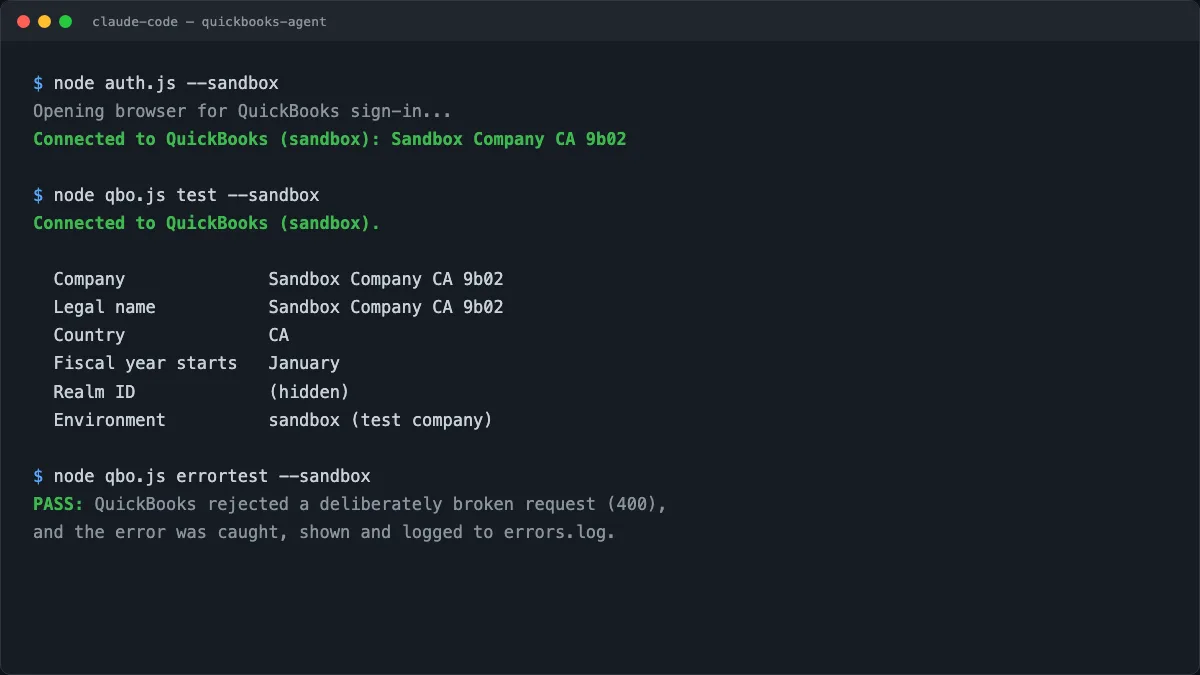
- A sandbox test, already passed. Intuit's questionnaire asks whether you tested connecting, disconnecting, and reconnecting on a sandbox company, and whether you tested how your app handles API errors. Run those tests first so both answers are an honest yes.
- A domain you own, for the callback. Production redirect URIs must be HTTPS on a real domain. Localhost works in sandbox only. More on exactly why in our redirect URI guide.
- Privacy policy and terms URLs. Intuit checks these are live before approving production keys, even for a private app nobody else will ever use.
- About 30 minutes, most of it spent on the one-shot compliance questionnaire.
The setup walkthrough
- Create your app and get development keys. These are instant, no review, and only connect to sandbox companies.
- Run the sandbox test. Connect, pull a report, deliberately trigger an error, then disconnect and reconnect. All six steps should pass before you move on.
- Host three small pages on your own domain for the launch, disconnect, and OAuth callback. These don't hold any secrets. They just bounce the approval code back to the script running on your own computer.
- Apply for production keys from your app's overview page, fill out the app details, and answer the compliance questionnaire honestly.
- Add your production redirect URI under Keys and Credentials, in the Production section specifically. The Development section is separate and should keep its localhost entry.
- Connect for real. Run the connect command once approval lands, click through the consent screen on your actual company, and point Claude Code at the production keys.
Common mistakes
Using localhost in the production redirect URI
This is the single most common reason a first attempt fails. Localhost only works with Development keys. See why Intuit rejects it and what to use instead.
Answering the questionnaire before you've actually tested anything
The questionnaire asks if you tested sandbox connect/disconnect and error handling. Answering yes without testing is a gamble, and it is the whole point of the question. Test first.
Forgetting the Connect/Reconnect URL
It is a separate, required field from your Launch URL, easy to miss, and listed as one of six app-detail tasks. Your launch URL usually works fine for both.
Assuming QuickBooks has a read-only mode for AI
It doesn't. Every scope that can read your books can also write to them. We cover what that means in is it safe to connect AI to QuickBooks.
Skip the manual setup
Get the QuickBooks Agent for Claude Code ($29). It scaffolds the project, pre-fills your questionnaire answers, hosts the three callback pages, and walks you through Intuit's production-keys process step by step, right inside Claude Code. Your keys stay on your own machine. Or have us set it up for you if you'd rather we handle it end to end.
Get the QuickBooks Agent ($29)Frequently Asked Questions
Do I need to be a developer to connect QuickBooks to Claude Code?▼
No coding required if you use a kit that scaffolds the project for you. You still need your own Intuit Developer account and about 20 to 30 minutes to answer Intuit's app assessment questionnaire yourself, since that part can't be outsourced to a third party.
Is there an official way to connect Claude to QuickBooks?▼
Yes. Intuit publishes a free, open-source QuickBooks Online MCP server on GitHub with well over a hundred tools. It's a broad developer toolkit, and you still need your own Intuit app and your own production keys to run it. Our kit is a narrower, owner-focused alternative built on the same underlying API.
How long does Intuit take to approve production keys?▼
Reports range from minutes to about 5 to 10 business days. Ours was approved the same day we submitted, but we had already tested the connection end to end on a sandbox company first, which is one of the things the questionnaire asks about.
Can I test this without touching my real books?▼
Yes. QuickBooks gives every developer account up to 5 sandbox companies preloaded with fake data. Connect, read, write, and disconnect against the sandbox as many times as you want before you ever request production keys.
Does my QuickBooks data have to pass through someone else's server?▼
Not if you set it up with your own production keys and run the connector on your own machine. Several hosted options exist that route your QuickBooks data through their platform for a monthly fee. A self-hosted setup, run through Claude Code, keeps your tokens and your books on hardware you control.
Related Reading

Written by
Sep Gaspari
Founder & Digital Marketing Strategist, Zio Advertising | Kelowna, BC
15+ years in digital marketing, Google Ads, and SEO. I've helped businesses across 12+ industries generate qualified leads and grow revenue through data-driven strategies. I don't just run campaigns, I obsess over results, test relentlessly, and treat your budget like it's my own.
Connect on LinkedIn→Based on our own setup of QuickBooks Online with Claude Code in October 2026. Sources: Intuit Developer documentation and the official intuit/quickbooks-online-mcp-server repository on GitHub.